Best Small Business Accounting Software: A Practical Guide
Choosing the best small business accounting software can make it easier to manage invoices, track expenses, monitor cash flow, and prepare financial reports. The right tool can reduce manual bookkeeping and help business owners understand how money moves through their companies. However, the best small business accounting software is not the same for every business. A freelancer who sends a few invoices each month has different requirements from a retail store that manages inventory, payroll, and hundreds of transactions. Pricing, accounting knowledge, integrations, and reporting features also affect which option makes the most sense. This guide compares established accounting platforms, explains their main strengths and limitations, and provides practical criteria for selecting software. Product features and subscription prices can change, so check each provider’s official website before purchasing.
What Is Small Business Accounting Software?
Small business accounting software is a digital tool that records business income, expenses, bills, invoices, and other financial transactions. Depending on the platform and subscription plan, it may also provide bank reconciliation, tax reports, inventory tracking, payroll integrations, and cash flow forecasts. The best small business accounting software helps turn daily transactions into organized financial records. Instead of relying entirely on spreadsheets and paper receipts, owners can review financial reports and identify unpaid invoices, rising expenses, and changes in profitability. For example, a freelance designer may use accounting software to invoice clients, record software subscriptions, and calculate project income. A small retail business may need additional features for inventory, supplier bills, sales tax, and employee payroll. Accounting software supports bookkeeping, but it does not automatically guarantee accurate records or tax compliance. Users still need to categorize transactions correctly, review reports, and follow the tax requirements that apply to their businesses.
Best Small Business Accounting Software: Top Options Compared
There is no single winner for every business. The following established platforms serve different needs, from basic invoicing to more comprehensive bookkeeping and financial reporting.
The descriptions below are based on official product information. Feature availability, plan limits, and prices can change.
1. QuickBooks Online

QuickBooks Online is a well-known accounting platform for small businesses that need bookkeeping, invoicing, expense tracking, and financial reporting in one system. It may suit owners who want to manage routine accounting while working with a bookkeeper or accountant. Depending on the plan, businesses can access features such as bank transaction categorization, profit and loss reports, bill management, and additional business tools. Main advantages:
- A broad range of accounting and reporting features.
- Options for working with accounting professionals.
- Integrations with selected business applications. Potential limitations:
- Subscription costs and included features vary by plan.
- Additional services may increase the overall expense.
- New users may need time to understand accounting terminology and workflows. Best for: Small businesses that want a comprehensive accounting platform and room to expand. Official website:
2. Xero

Xero offers cloud based accounting with invoicing, bank reconciliation, expense management, and financial reporting. Its US plans include different limits and features, so businesses should compare the current plan details before signing up.
One potential advantage is that Xero does not charge a separate software licence fee for every user on its standard plans, according to its official US pricing information. That can be worth considering when several team members need access.Main advantages:
- Accounting features that support growing businesses.
- Bank reconciliation and financial reports.
- Multiuser access without per user licence fees on standard plans. Potential limitations:
- Lower tier plans may limit invoices or bills.
- Payroll, inventory, or other specialist needs may require additional services or integrations. Best for: Businesses that need shared accounting access and want to scale their bookkeeping processes. Official website:
3. FreshBooks

FreshBooks focuses on invoicing, expense tracking, estimates, and accounting workflows that are useful to service based businesses. Its plans offer different client limits and reporting capabilities.
Freelancers, consultants, and creative professionals may find it useful when their main priorities are billing clients, recording expenses, and understanding the profitability of projects.Main advantages:
- Client invoicing and estimates.
- Expense tracking and accounting reports.
- Features for projects and client retainers on applicable plans. Potential limitations:
- Some plans limit the number of billable clients.
- Additional users and optional services may cost extra.
- Businesses with complex inventory requirements should confirm whether the available tools meet their needs. Best for: Freelancers, consultants, and small service businesses. Official website:
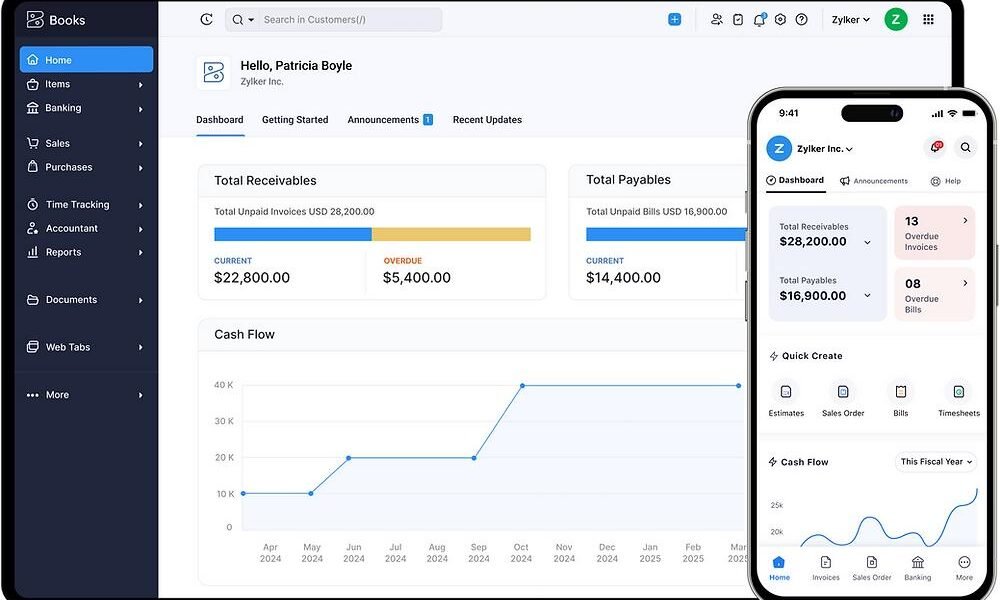
4. Zoho Books

Zoho Books provides invoicing, expense tracking, bank reconciliation, financial reports, and higher tier features for inventory, projects, and workflow automation. Its US pricing page lists a free plan as well as paid subscriptions with different user and feature limits
For a small business already using other Zoho products, the wider ecosystem may be useful. However, buyers should compare the included features and confirm whether the free plan’s eligibility and transaction limits suit their business.Main advantages:
- A free starting option for eligible small operations.
- Multiple paid tiers for different business requirements.
- Reporting, automation, and integrations across selected tools. Potential limitations:
- Advanced features require higher tier plans.
- User limits and transaction allowances differ between subscriptions. Best for: Cost conscious businesses that want accounting features with the option to expand. Official website:
5. Wave

Wave offers accounting and invoicing tools for small businesses, including a Starter plan listed at no monthly subscription cost and a paid Pro plan. Its official pricing page also lists transaction fees for certain online payment methods and optional services.
For a new freelancer or very small business, Wave may be worth evaluating if basic bookkeeping and invoicing are the main priorities. Before choosing it, verify regional availability and whether its bank connections, payment features, and tax workflows work for your location.Main advantages:
- A free plan for basic accounting and invoicing.
- Tools to create estimates, invoices, and bookkeeping records.
- A paid option with additional automation and features. Potential limitations:
- Payment processing and optional services can add costs.
- Some advanced features are only available on paid plans or as add-ons.
- Availability and supported services may vary by country. Best for: Eligible small businesses that want a relatively simple starting point. Official website:
Quick Comparison of the Best Small Business Accounting Software
| Software | Best suited for | Main strengths | What to check |
|---|---|---|---|
| QuickBooks Online | Growing small businesses | Broad accounting tools and reports | Plan pricing and add-ons |
| Xero | Collaborative bookkeeping | Bank reconciliation and shared access | Transaction limits and integrations |
| FreshBooks | Freelancers and service providers | Invoicing and project features | Client and user limits |
| Zoho Books | Budget conscious businesses | Tiered features and free option | Eligibility and plan limits |
| Wave | Eligible microbusinesses | Basic invoicing and bookkeeping | Country support and payment fees |
This comparison is a starting point, not a universal ranking. The best small business accounting software for your situation depends on your transaction volume, reporting needs, budget, and the way you manage your business.
How to Choose the Right Accounting Software for Your Business
Selecting the best small business accounting software requires more than comparing monthly subscription prices. A low cost plan may be sufficient for a freelancer but unsuitable for a business that needs payroll, inventory, multiple users, or advanced reporting.
1. Identify Your Essential Accounting Tasks
Start by listing the work you need the software to handle. Most small businesses benefit from reliable income and expense tracking, invoicing, bank reconciliation, and profit and loss reports. Businesses that sell physical products may also need inventory tracking and purchase order management. The best small business accounting software should solve your most important problems without making everyday bookkeeping unnecessarily complicated.
2. Compare the Total Cost
Look beyond the advertised monthly price. Depending on the provider, the total cost may include:
- Subscription fees and annual billing commitments.
- Additional user accounts.
- Payment processing charges.
- Payroll or inventory add-ons.
- Accountant access, integrations, or support services.
- Data migration or bookkeeping assistance. For example, a free accounting plan may be sufficient for a business with a few monthly transactions. If the business later needs automatic bank feeds or advanced reporting, a paid plan may offer better value.
3. Check Bank Connections and Reconciliation
Bank reconciliation means comparing the transactions in your accounting records with the transactions shown on your bank statement. It helps identify missing entries, duplicate records, and discrepancies. Before choosing the best small business accounting software, confirm that it supports your bank and the account types you use. Automated transaction imports can save time, but you should still review imported entries for accuracy.
4. Review Reports and Cash Flow Tools
A useful accounting platform should help you understand your financial position, not merely store transactions. Look for reports such as:
- Profit and loss statement, which summarizes revenue and expenses over a period.
- Balance sheet, which shows assets, liabilities, and equity at a particular date.
- Cash flow information, which helps explain cash entering and leaving the business.
- Accounts receivable reports, which show money customers owe.
- Accounts payable reports, which show bills the business needs to pay. These reports answer different questions. A profitable business can still face cash shortages when customers pay late or large bills become due.
5. Consider Ease of Use and Accountant Access
Accounting software should fit your team’s existing skills. A system with many features is not necessarily the best small business accounting software if you struggle to enter transactions correctly. Consider the quality of help documentation, mobile access, accountant permissions, data export options, and availability of customer support. If you plan to change providers later, check how you can export invoices, transactions, reports, and customer records.
6. Check Security and Data Protection
Accounting systems can contain sensitive business and customer information. Review the provider’s security documentation and available account protections before connecting financial accounts. Look for multifactor authentication, user permission controls, secure connections, backup and recovery information, and clear privacy policies. Limit access to people who genuinely need it, and use strong, unique passwords.
Is Free Accounting Software Enough for a Small Business?
Free accounting software can be a sensible starting point for freelancers, sole proprietors, and businesses with straightforward transactions. However, free plans differ in what they include. Before choosing a free option, check:
- Whether your business and country are eligible.
- How many invoices, customers, users, and transactions are allowed.
- Whether bank feeds and reconciliation are included.
- Whether tax reports meet your needs.
- Which payment processing fees apply.
- Whether you can export your data if you switch platforms. The best small business accounting software is not necessarily the one with the lowest price. A paid plan can be worthwhile when it reduces repetitive work or provides important features, but paying for tools you never use adds unnecessary overhead.
Common Accounting Software Mistakes to Avoid
Even well designed accounting tools cannot compensate for poor bookkeeping practices. Avoid these common mistakes when setting up a system.
Mixing Personal and Business Transactions
Use separate business banking arrangements where appropriate, and record any owner contributions or withdrawals correctly. Mixing personal and business transactions makes reconciliation and tax preparation more difficult.
Ignoring Subscription Limits
A plan that works for ten invoices a month may not work when your business sends hundreds. Review the limits on customers, users, invoices, storage, and integrations before committing.
Assuming Reports Are Automatically Correct
Software reports depend on the information entered. Incorrect categories, duplicate transactions, missing bills, and unreconciled bank records can produce misleading results. Review records regularly and investigate unusual balances.
Forgetting About Tax Requirements
Accounting software may calculate or organize tax information, but it does not guarantee that your returns comply with applicable rules. Requirements depend on your country, business structure, and tax situation. Verify relevant requirements with the appropriate tax authority or a qualified tax professional.
Choosing Software Without Testing It
Whenever possible, use a trial or free plan to test your actual workflow. Create a sample invoice, record an expense, reconcile a transaction, and generate a report. This practical test can reveal whether the best small business accounting software for your needs is genuinely easy to use.
How to Set Up Your Accounting Software
Once you select a platform, follow a structured setup process.
- Create your business profile and enter the correct business details.
- Configure your financial year, currency, and applicable tax settings.
- Connect supported bank accounts securely, if you intend to use bank feeds.
- Import existing records carefully and check opening balances.
- Set up customers, suppliers, products, services, and invoice templates.
- Establish categories for income, expenses, assets, and liabilities.
- Reconcile transactions and review your initial financial reports.
- Schedule regular bookkeeping reviews and arrange professional assistance when necessary. Do not import years of historical data without checking its quality. Inaccurate opening balances or duplicated transactions can affect future reports, even if the software itself works correctly.
FAQ: Best Small Business Accounting Software
What is the best small business accounting software for beginners?
Wave, Zoho Books, and FreshBooks are options worth comparing for beginners, depending on location, budget, and required features. Test the interface and make sure the plan supports your essential bookkeeping tasks.
What is the best small business accounting software for freelancers?
FreshBooks is worth considering for freelancers who prioritize client invoicing, estimates, and project tracking. Zoho Books and other accounting platforms may also fit, depending on reporting and bank reconciliation requirements.
Is free accounting software good enough for a small business?
Yes, a free plan may be enough when transactions are simple and included features meet your needs. Check customer limits, bank connections, payment fees, regional availability, and reporting restrictions before choosing.
Does accounting software calculate business profit?
Accounting software can calculate profit from recorded income and expenses. However, the result depends on correct transaction categorization, complete records, and the accounting method being used.
Can accounting software help with taxes?
It can organize financial records and generate reports that support tax preparation. Tax calculations, filing features, and compliance depend on the software, subscription, and jurisdiction. Consult a qualified tax professional when needed.
How much does small business accounting software cost?
Costs vary by provider and subscription. Some platforms offer free plans, while paid subscriptions can include additional users, automation, reporting, and other features. Check current official pricing and additional fees before purchasing.
Can I change accounting software later?
Usually, yes, but the process depends on the providers and available export tools. Before switching, check how to transfer transactions, customer records, invoices, opening balances, and historical reports.
Should I hire a bookkeeper if I use accounting software?
Not every small business needs a bookkeeper for routine transactions. Professional help can be valuable for complex reconciliations, tax preparation, payroll, financial reporting, and reviewing unusual transactions.
Final Takeaway
The best small business accounting software is the platform that matches your business’s actual bookkeeping needs, budget, and growth plans. QuickBooks Online and Xero are worth evaluating for broader accounting workflows, FreshBooks for service based businesses, Zoho Books for its range of plans, and Wave for eligible businesses seeking basic accounting tools. Compare the current features and full costs before deciding. Test the software with realistic transactions, confirm that it supports your location, and make sure you can maintain accurate records over time. Good accounting software can make financial management more organized, but informed decisions and consistent bookkeeping remain essential.
You may also find blog on below
Best Stocks to Buy Now
Related Wealth Articles

American First Finance: A Complete Guide to Payment Options, Costs, and Customer Considerations
What Is American First Finance? American First Finance is a consumer financing company that offers payment solutions through…

Capital One Customer Service 24/7 Phone Number: How to Get Help
Finding the Capital One customer service 24/7 phone number can help you determine how to contact the company…
1 Discussion Comment